ZRB files use Smacker 2
The five inspected TA movies, Data/1.zrb through Data/5.zrb, are Smacker 2 files beginning with SMK2. There is no extra ZRB container around the Smacker data. Each packet can update the palette, carry audio and describe which parts of the next video frame to draw or keep.
Moving rectangle example
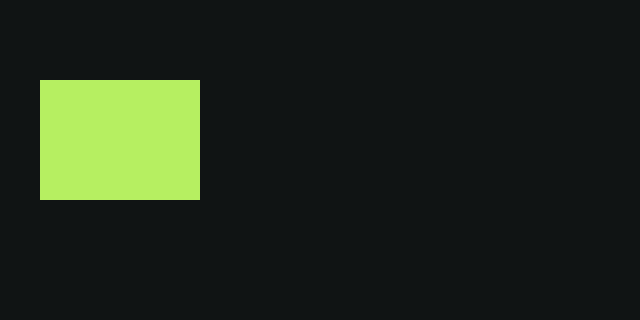
Stored extent · each block is 4 × 4 pixels.
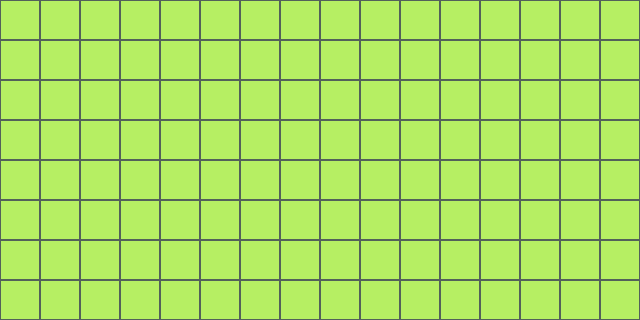
Solid write Retain previous indices
- Solid writes
- 128 / 128
- Retained blocks
- 0 / 128
- Palette chunk
- 16 bytes
Packet 0 · offset 202 · 48 bytes · mask 0x01
The first packet writes the rectangle and its background.
Enable JavaScript to play or scrub this original clip. Download the SMK2 (.zrb) · Decoded frame data
The rectangle moves four pixels per frame: one column of 4 × 4 blocks. Most steps need just six solid writes—three blocks at its leading edge and three to restore the background behind it. At a color change, 15 writes repaint the rectangle and clear its trailing edge. All other blocks retain their previous pixel indices.
This clip keeps its palette fixed and changes the rectangle’s color by writing different indices. A palette update can also change colors without rewriting any pixels; the palette example below shows that separate behavior.
The instruction map marks type 3 solid writes with bright squares and type 2 retained blocks with dark squares and dashes. The views come from decoding the downloadable binary; the browser plays generated SVG frames. Both examples on this page are silent, have no ring packet, and use one block per instruction. They do not exercise two-color or full-color blocks.
Locating packets
All scalar fields are little-endian. The physical packet count is the logical frame count plus one if the ring flag is set. After the fixed header, read the packet-size table, content-mask table, video trees, and then packets in sequence.
104-byte header
  → physical packet count × 4-byte size words
  → physical packet count × 1-byte content masks
  → video-tree section (header gives its byte length)
  → packet 0 → packet 1 → … → optional ring packet
For each size word, clear the low two bits to obtain the packet length. Bit 0 marks a keyframe. The purpose of bit 1 remains unknown; neither bit changes sequential decoding. The ring packet is indexed but is not one of the frames in play-once playback.
| Content-mask bit | Chunk present | Position inside packet |
|---|---|---|
| 0 | Palette | First, if present. |
| 1–7 | Audio tracks 0–6 | After the palette, in ascending track order. |
| No separate bit | Video bitstream | After all declared palette and audio chunks. |
Byte layouts
Fixed header
These offsets are file-relative. The fixed header ends at byte 104 (0x68).
Scroll table horizontally to see all fields →
| Offset | Bytes | Type | Field | Meaning |
|---|---|---|---|---|
0x00 | 4 | ASCII | Signature | SMK2; SMK4 is another video revision. |
0x04, 0x08 | 4 each | u32 | Width, height | Stored pixel dimensions. |
0x0C | 4 | u32 | Frame count | Logical frames to play. |
0x10 | 4 | i32 | Frame interval | Positive: milliseconds. Negative: magnitude × 10 microseconds. |
0x14 | 4 | u32 | Flags | Bit 0: ring packet. Bit 1: alternate black rows. Bit 2: repeated rows. Either display mode doubles height. |
0x18 | 28 | u32[7] | Audio sizes | Largest decoded packet size for each track. |
0x34 | 4 | u32 | Tree bytes | Encoded video-tree section length. |
0x38 | 16 | u32[4] | Tree allocation hints | Map, color-pair, full-color-pair, block-type order. |
0x48 | 28 | u32[7] | Audio descriptions | Rate, presence, codec, width, and channels. |
0x64 | 4 | u32 | Reserved | Reserved word. |
Audio track description
Each description is a u32 at 0x48 + 4 × track, for tracks 0 through 6.
| Bits | Meaning |
|---|---|
| 0–23 | Sample rate. |
| 26 or 27 | Alternative perceptual codec selection. |
| 28 | Stereo if set. |
| 29 | Sixteen-bit samples if set; otherwise unsigned eight-bit samples. |
| 30 | Track present. |
| 31 | Compressed audio. |
The palette example’s file boundaries
The separate palette example uses example.zrb, a 990-byte signal sweep. This file has 16 logical and physical packets. Its first size word is 53 (0x35): keyframe bit 0 is set, and clearing the low two bits gives 52 bytes.
| File offset | Length | Contents |
|---|---|---|
| 0 | 104 bytes | Fixed header: SMK2, 64 × 32, 16 frames, interval 125, flags 4. |
| 104 | 64 bytes | Sixteen packet-size words. |
| 168 | 16 bytes | Content masks; packets 0 and 8 have mask 0x01. |
| 184 | 18 bytes | Video trees; only the block-type tree is present. |
| 202 | 52 bytes | Packet 0: 16 palette bytes and 36 video/padding bytes. |
| 590 | 64 bytes | Packet 8: 16 palette bytes and 48 video/padding bytes. |
| 990 | — | End of file. |
The palette clip’s decoded frame data records every packet’s offset and length. The first packet writes all 128 blocks. Moving the scan column requires 12 solid writes per frame; frame 8 instead retains all 128 blocks and updates the palette. Packet length depends on the encoded symbols, so fewer pixel writes do not necessarily mean a smaller packet.
Frame timing and display size
A positive interval of 125 means 125 milliseconds per frame. A negative interval of −3333, used by all five inspected movies, means 3333 × 10 µs = 33.33 ms. Each example’s 16 frames at 125 ms take two seconds to play at the stored speed.
Stored height and display height are separate. Repeating each stored row and inserting an alternate black row both double the display height, but produce different pictures. Nanolathe’s format reader reports the display extent; it does not render these display modes. The palette example’s Double rows control illustrates repeated rows, selected by its header flag 4. The moving rectangle uses flags 0, so stored and display dimensions are both 64 × 32.
Bits, Huffman trees, and caches
Bits are consumed least-significant first within each byte. The first bit of a multi-bit integer is also its least-significant bit. Tree topology is prefix ordered: 0 introduces a leaf; 1 introduces the zero branch followed by the one branch.
A byte-valued tree starts with a presence bit. An absent tree yields zero. A present tree stores eight bits at each leaf and finishes with a zero delimiter after the complete topology. A constant leaf requires no traversal bits. The terminating delimiter is established by asset parsing and authored fixtures; the public description omits it.
The video section contains four word-valued trees, in this order:
- Map words: sixteen two-color selectors.
- Color-pair words: two palette indices.
- Full-color-pair words: two palette indices for full-color blocks.
- Block-type words: operation, run length, and solid color.
Each word tree starts with a presence bit. A present word tree contains low-byte and high-byte trees, three literal 16-bit cache-marker values, its topology, and a final zero delimiter. Decode each topology leaf through the low-byte tree first, then the high-byte tree. A leaf matching a marker references one of three cache slots, initially zero.
Each word tree keeps its own three most recent distinct-in-succession outputs. Resolve a cache reference before updating the cache. If the value equals the newest entry, leave the cache unchanged; otherwise shift the entries and install the new value. Reset all caches before every video frame. Cache markers do not need a physical leaf if unreferenced.
The tree section may have unused trailing bytes. Its declared byte length, not the end of the final topology, locates the first packet.
Palette updates
A retained block keeps its palette indices, not a frozen RGB color. If the palette changes, the displayed picture can change even when every block retains its pixels.
Compare a palette-only update
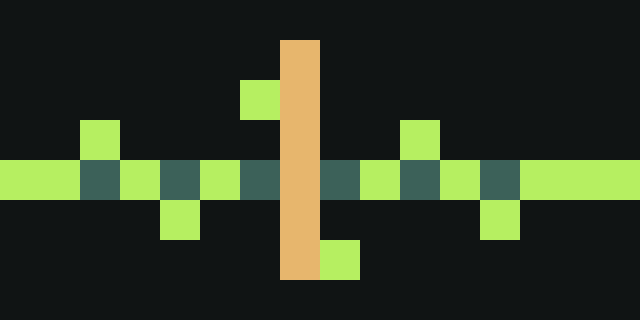
Stored extent · each block is 4 × 4 pixels.
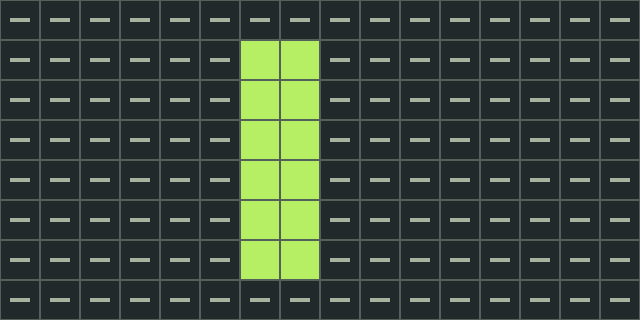
Solid write Retain previous indices
- Solid writes
- 12 / 128
- Retained blocks
- 116 / 128
- Palette chunk
- 0 bytes
Packet 7 · offset 542 · 48 bytes · mask 0x00
Twelve solid writes move the scan column; the other 116 blocks retain their previous indices.
Enable JavaScript to compare the palette change. Download the SMK2 (.zrb) · Decoded frame data
Palette operations fill entries starting at index zero. Keep an immutable copy of the previous palette for copy operations. For control byte c:
| Condition | Operation | Extra bytes |
|---|---|---|
| Bit 7 set | Retain the next (c & 127) + 1 entries in place. | None. |
| Bit 7 clear, bit 6 set | Copy (c & 63) + 1 entries from the previous palette to the output cursor. | One source index. |
| Both high bits clear | Write one literal color; c is red. | Green, then blue. |
Literal components are six-bit values. Expand each with (v << 2) | (v >> 4). The order is red, green, blue, established by an authored pure-red reference; the public description’s component labels are inverted. Palette colors are opaque, including index zero.
Stop at 256 entries or chunk exhaustion. Bytes beyond the declared palette span belong to the next chunk, even if not all palette entries were visited. Overlapping copies still read from the old palette, never from entries just written.
In frame 8 of the palette example, palette index 2 changes from (45, 59, 24) to (57, 23, 17) in six-bit components. That is RGB (182, 239, 97) → (231, 93, 69) after expansion. Every pixel index is retained, but the waveform turns from green to red. The 16-byte chunk writes four RGB literals, retains the remaining 252 entries, and has one padding byte.
Four block operations
Visit 4 × 4 blocks from left to right, then top to bottom. Clip partial edge blocks to stored dimensions. Decode a word from the type tree: its low two bits select the operation, bits 2–7 select a run length, and the high byte supplies a solid color.
| Type | Operation | Decode for each block in the run |
|---|---|---|
| 0 | Two-color | A color-pair word, then a map word. Successive low-to-high map bits select the low-byte color for 0 and high-byte color for 1, in pixel row order. |
| 1 | Full-color | Two full-color-pair words per row, for four rows. The first word supplies columns 2 and 3; the second supplies 0 and 1, low byte then high byte in each pair. |
| 2 | Retain | Keep the previous frame’s pixel indices. |
| 3 | Solid | Fill with the type word’s high byte. |
Run indices 0–58 mean index plus one blocks. Indices 59–63 mean 128, 256, 512, 1024, and 2048 blocks respectively. Repeat the operation for that many consecutive blocks; additional color and map words are decoded for each block that needs them.
For example, 0x0303 means a one-block solid fill with palette index 3. 0x0002 retains one block. Those are two of the five type-tree values used in both downloadable clips.
Audio decoding
Every audio chunk starts with its inclusive u32 length. Uncompressed chunks then contain PCM: unsigned bytes or signed little-endian 16-bit words, with stereo channels interleaved left then right.
Compressed chunks add a u32 decoded source-byte count, followed by an independent bitstream. The first three bits specify data presence, stereo, and sixteen-bit samples. Width and channel flags must agree with the track description; an absent-data chunk yields no samples.
For Huffman DPCM, build one byte tree per byte in an interleaved sample frame: one for eight-bit mono, two for eight-bit stereo or sixteen-bit mono, and four for sixteen-bit stereo.
- Read initial channel samples in reverse channel order. For sixteen-bit samples, read the high byte before the low byte. Output those initial samples in ordinary channel order.
- Decode following deltas in ordinary channel order, low-byte tree then high-byte tree for sixteen-bit data.
- Assemble a complete delta word before adding it to the previous sample, modulo 65536 for sixteen-bit or modulo 256 for eight-bit data. Low-byte overflow carries into the high byte.
- Stop at the declared decoded source-byte count, including the initial samples. Restart the predictors in the next packet.
Nanolathe expands unsigned bytes to signed16 with (sample − 128) × 256 and preserves sixteen-bit values. It does not resample or remix channels. The WAV guide includes original playable PCM examples for comparing sample widths.
The five inspected cinematics
These are observations of the supplied corpus, not format limits. All five movies store interval −3333 and one compressed 22,050 Hz, stereo, unsigned-eight-bit audio track. Reading that track as mono sixteen-bit audio would misinterpret its samples.
| Movie | Stored pixels | Display pixels | Logical frames |
|---|---|---|---|
| 1 | 640 × 240 | 640 × 480 | 599 |
| 2 · Intro | 640 × 240 | 640 × 480 | 4,058 |
| 3 | 640 × 240 | 640 × 480 | 889 |
| 4 | 640 × 240 | 640 × 480 | 1,841 |
| 5 | 640 × 304 | 640 × 304 | 4,020 |
The pinned research records a black-box comparison against FFmpeg 8.1.1: all 11,407 RGB24 frames match frame MD5s, and each complete signed16 soundtrack matches its SHA256. The separate whole-track audio pass matches the same reference. An independently authored sixteen-bit stereo stream also matches (255, −32768), (257, 32767), (259, 32766), covering channel-base order and low-byte carry beyond the stock eight-bit corpus. No FFmpeg library is linked or required at runtime.
Reader support and open questions
Borrowed input must remain immutable. Frame pixels and per-packet audio may be reused on the next call. A whole-track audio pass walks indexed packets through the shared audio decoder without advancing video or decoding its blocks.
Retail imports playback from RAD’s smackw32.dll; it contains no Smacker decoder of its own. Decoder internals are outside the analyzed executable corpus. The byte-level account here rests on public format documentation, asset parsing, authored fixtures, and reference-decoder comparisons.
For the order in which the game plays movies, see [08 R-OOS-01 §4]. This guide covers the file format; device handling and playback timing are documented separately.
Sources and example files
Adapted from the ZRB research at the pinned sidebar revision. The complete source snapshot preserves evidence labels, public-format references, corrections, and implementation boundaries.
The moving rectangle, its decoded packet data, the palette-change clip, its decoded packet data, and all SVG frame views are original assets generated by scripts/zrb-example.py. No retail movie frames or audio are included. The generator decodes both binaries to check the rectangle’s motion, its changes of palette index, and the signal sweep’s palette-only transition, then produces the previews from that decoded data. Its reader covers these fixtures’ solid/retain subset, not general Smacker decoding.
python3 scripts/zrb-example.py --check
# Optional authoring check; requires the FFmpeg command-line tool:
python3 scripts/zrb-example.py --check --verify-ffmpeg
The optional check compares all 32 stored RGB24 frames across both clips, byte for byte, against FFmpeg. The normal website checks use only Python’s standard library and do not require FFmpeg, an engine checkout, or game data.